Track your nutrition
in ChatGPT
Tell ChatGPT what you ate and it's logged. Ask what to order anywhere and get an order that fits what you have left today. Free, no subscription.
Takes a couple of minutes. Completely free.
Already use Simple Macros? Add to ChatGPT
I weighed 182.4 this morning
 Simple MacrosLog weigh-in
Nice work! Logged 182.4 lb. That's 1.2 lb down this week, keep it up!
Lunch was a Chipotle bowl with chicken, white rice, black beans, fajita veggies, mild salsa and cheese
Simple MacrosLog mealGreat choice! Logged your bowl: 675 cal, 51g protein. You still have 1,120 calories and 74g protein to play with today.
Set up in three steps
Create your free account
Use Google, Apple or email, then answer a few quick questions so we can set your calorie and protein goals.
Add to ChatGPT
Simple Macros opens in ChatGPT. Click Install plugin, connect your account, and approve.
Start asking
You're back in ChatGPT. Try “How many calories do I have left today?”
ChatGPT didn't open? In ChatGPT, open Plugins (or go to chatgpt.com/plugins), search for Simple Macros and tap Install plugin, then connect your account. Tip: start a message with @Simple Macros to make sure ChatGPT uses it.
Try one meal, then check your diary.
Once you're connected, use a meal you actually ate to follow the full path from ChatGPT to Simple Macros. These are steps to try yourself, rather than a recording of a test.
1. Ask to log the meal
For example: “Log 2 eggs and 1 slice of whole wheat toast for breakfast today.” Include the amounts and any extras you ate. Review what ChatGPT reports; ask it to correct anything that doesn't match.
2. Check what was saved
Ask “What have I logged today?” Check that breakfast appears once with the foods and amounts you intended. If you approved Read-only access, the assistant can look at your diary but cannot save a new meal.
3. Open the same account in the app
On Track, select the same day and check the meal. The mobile app and ChatGPT use the same Simple Macros account. Compare the saved food and portion, rather than expecting your totals to match an example screenshot.
4. Plan your next order
Try “What can I order at Chick-fil-A with the calories and protein I have left today?” Review the suggested order before asking to log it. You can also explore the menu on the website.
See an example of a saved meal in the app
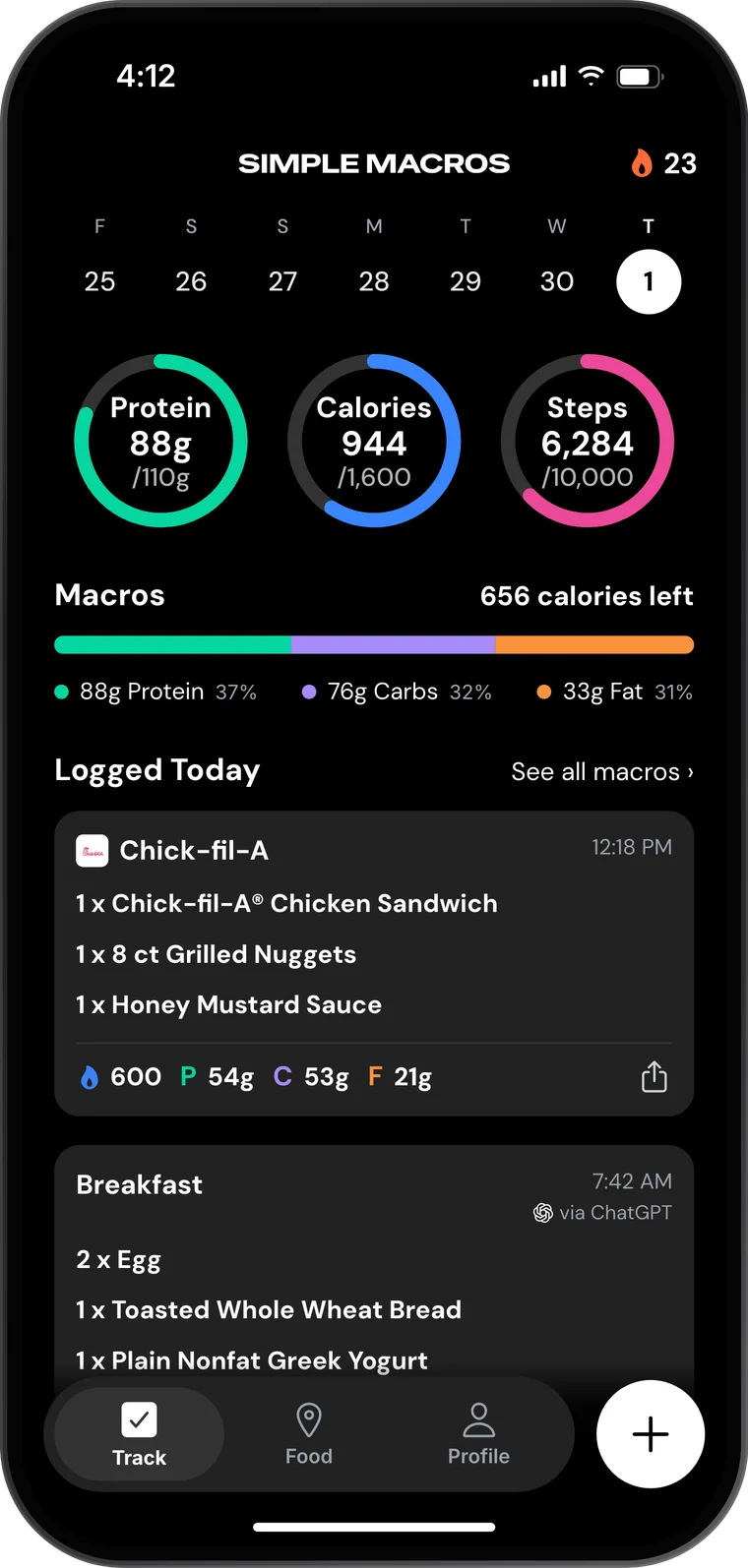
Meal missing? Check the account, date and connection permissions before logging it again. Ask the assistant to send a problem report if something went wrong. You can disconnect on Connected apps. New to tracking? Follow the first-day guide.
Things you can ask
- “What can I eat at In-N-Out to fill out the rest of my macros for the day?”
- “Give me a 650 calorie Chick-fil-A order with the spicy sandwich and no fries, then track the first one.”
- “Is there a Chipotle near 85281?”
- “Track this meal”
- “How much protein do I have left today?”
- “Log 2 eggs and toast for breakfast”
Log food by saying it
Tell ChatGPT what you ate, or name a Favorite. It lands in your day with the calories and protein filled in.
Order anywhere
Ask what to get at any of 170+ restaurant chains and get an order from the full menu that fits what you have left today.
Know what's left
Calories and protein left today, your streaks, and which nutrients you've been missing.
Weigh-ins and goals
Log a weigh-in, see your trend, and change your goals by asking.
Want the app too?
Same account, also free. Scan a barcode, snap a photo of your meal, and see your day at a glance. Everything you log in ChatGPT is there.
Questions
- Is it free?
- Yes. Simple Macros is free, and so is connecting it to ChatGPT. No subscription, no paywall.
- Do I need the Simple Macros app?
- No. You can set up your account and track from ChatGPT alone. The free app adds barcode scanning, photo logging and your day at a glance. It's the same account, so everything you log in ChatGPT is there too.
- What can ChatGPT see?
- Only what you approve on simplemacros.com when you connect. Pick Read-only and it can look but never change anything. Disconnect any time at simplemacros.com/connect and it stops working right away. We never receive your conversations. Privacy policy
- Where do the numbers come from?
- Whole foods come from USDA FoodData Central, with USDA's numbers unchanged. Packaged foods use the manufacturer's label data from USDA's Branded Foods database, plus products people who use the app add, usually from a photo of the label; one product per barcode. Restaurant items use each chain's official published nutrition, including every customization, and any number we had to estimate is marked as an estimate in the tool result. Where our nutrition data comes from
Using Claude, Grok or another AI app? See every way to connect
Your nutrition tracker, in ChatGPT.
Free. No subscription, no paywall.
Get Started Free